test01.jsp
<%@ page language="java" contentType="text/html; charset=UTF-8"
pageEncoding="UTF-8"%>
<!DOCTYPE html>
<html>
<head>
<meta charset="UTF-8">
<title>/test_el/test01.jsp</title>
</head>
<body>
<h1>Expression Language (EL)</h1>
<p>jsp 페이지에서 특별하게 해석되는 코드 블럭</p>
<p>EL 영역은 ${ } 로 만들수 있습니다.</p>
<h2>산술연산</h2>
<p>1+1 = ${1+1 }</p>
<p>10-1 = ${10-1 }</p>
<p>10*10 = ${10*10 }</p>
<p>10/3 = ${10/3 }</p>
<h2>비교연산</h2>
<p>10 > 2 : ${10 > 2 }</p>
<p>10 > 2 : ${10 gt 2 }</p>
<p>10 ≥ 2 : ${10 >= 2 }</p>
<p>10 ≥ 2 : ${10 ge 2 }</p>
<p>10 < 2 : ${10 < 2 }</p>
<p>10 < 2 : ${10 lt 2 }</p>
<p>10 ≤ 2 : ${10 <= 2 }</p>
<p>10 ≤ 2 : ${10 le 2 }</p>
<p>10 == 10 : ${10 == 10 }</p>
<p>10 == 10 : ${10 eq 10 }</p>
<p>10 != 10 : ${10 != 10 }</p>
<p>10 != 10 : ${10 ne 10 }</p>
<h2>논리연산</h2>
<p> true || false : ${true || false }</p>
<p> true or false : ${true or false }</p>
<p> true && false : ${true && false }</p>
<p> true and false : ${true and false }</p>
<p> !true : ${!true }</p>
<p> not true: ${not true }</p>
<h2>empty 연산자 (비어 있는지 여부)</h2>
<p> null 혹은 빈 문자열("") 는 true 로 판정된다.</p>
<p> empty null : ${empty null }</p>
<p> empty "" : ${empty "" }</p>
<p> not empty null : ${ not empty null }</p>
<p> not empty "" : ${ not empty "" }</p>
<h3>3 항 연산</h3>
<p> ${ true ? 'coffee' : 'water' }</p>
<p> ${ false ? 'coffee' : 'water' }</p>
</body>
</html>Expression Language (EL)
jsp 페이지에서 특별하게 해석되는 코드 블럭
EL 영역은 ${ } 로 만들수 있습니다.
산술연산
1+1 = 2
10-1 = 9
10*10 = 100
10/3 = 3.3333333333333335
비교연산
10 > 2 : true
10 > 2 : true
10 ≥ 2 : true
10 ≥ 2 : true
10 < 2 : false
10 < 2 : false
10 ≤ 2 : false
10 ≤ 2 : false
10 == 10 : true
10 == 10 : true
10 != 10 : false
10 != 10 : false
논리연산
true || false : true
true or false : true
true && false : false
true and false : false
!true : false
not true: false
empty 연산자 (비어 있는지 여부)
null 혹은 빈 문자열("") 는 true 로 판정된다.
empty null : true
empty "" : true
not empty null : false
not empty "" : false
3 항 연산
coffee
water
test02.jsp
<%@ page language="java" contentType="text/html; charset=UTF-8"
    pageEncoding="UTF-8"%>
<%
	String myName="김구라";
	/*
		page scope 에  "myName" 이라는 키값으로 myName 담기
		해당 jsp 페이지 에서만 사용할수 있다.
	*/
	pageContext.setAttribute("myName", myName);

	String yourName="해골";
	/*
		request scope 에 "yourName" 이라는 키값으로 yourName 담기
		request scope 에 담은 값은 응답하기 전까지 사용할수 있다.
		(다른 페이지로 forward 이동해도 사용할수 있다)
		(다른 페이지로 redirect 이동하면 사용할수 없다)
	*/
	request.setAttribute("yourName", yourName);

	String ourName="원숭이";
	/*
		session scope 에  "ourName" 이라는 키값으로 ourName 담기
		session scope 에 담은 값은 세션이 유지 되는 동안 사용할수 있다.
		(다른 페이지로 forward, redirect 이동 해도 사용할수 있다)
		(웹브라우저를 닫거나 세션을 초기화 하기 전까지 사용할수 있다)
	*/
	session.setAttribute("ourName", ourName);

	String companyName="에이콘";
	/*
		application scope 에 "companyName" 이라는 키값으로 companyName 담기
		application scope 에 담은 내용은 서버를 끄기 전까지 사용할수 있다.
		(웹브라우저를 닫아도 지워지지 않는다)
	*/
	application.setAttribute("companyName", companyName);

%>
<!DOCTYPE html>
<html>
<head>
<meta charset="UTF-8">
<title>/test_el/test02.jsp</title>
</head>
<body>
	<h1> EL 로 page scope 에 저장된 값 추출</h1>
	<p>내이름은 <strong>${pageScope.myName }</strong></p>
	<p>내이름은 <strong>${myName }</strong></p>

	<h1>EL 로 request scope 에 저장된 값 추출</h1>
	<p>너의 이름은 <strong>${requestScope.yourName }</strong></p>
	<p>너의 이름은 <strong>${yourName }</strong></p>
	<%-- 위의 EL 은 아래의 코드를 대신할수 있다. --%>
	<%
		String result = (String)request.getAttribute("yourName");
	%>
	<p>너의 이름은 <strong><%=result %></strong></p>

	<h1>EL 로 session scope 에 저장된 값 추출</h1>
	<p>우리 이름은 <strong>${sessionScope.ourName }</strong></p>
	<p>우리 이름은 <strong>${ourName }</strong></p>
	<%-- 위의 EL 은 아래의 코드를 대신할수 있다. --%>
	<%
		String result2 = (String)session.getAttribute("ourName");
	%>
	<p>우리 이름은 <strong><%=result2 %></strong></p>

	<h1>EL 로 application scope 에 저장된 값 추출</h1>
	<p>학원 이름은 <strong>${applicationScope.companyName }</strong></p>
	<p>학원 이름은 <strong>${companyName }</strong></p>
</body>
</html>
EL 로 page scope 에 저장된 값 추출
내이름은 김구라
내이름은 김구라
EL 로 request scope 에 저장된 값 추출
너의 이름은 해골
너의 이름은 해골
너의 이름은 해골
EL 로 session scope 에 저장된 값 추출
우리 이름은 원숭이
우리 이름은 원숭이
우리 이름은 원숭이
EL 로 application scope 에 저장된 값 추출
학원 이름은 에이콘
학원 이름은 에이콘
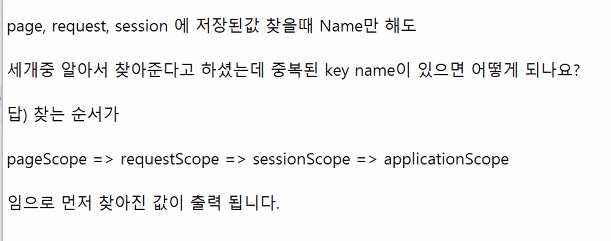
pageScope, requestScope, sessionScope, applicationScope는 생략하고 keyname 만 작성해도 실행가능하다.
test03.jsp
<%@page import="test.member.dto.MemberDto"%>
<%@ page language="java" contentType="text/html; charset=UTF-8"
    pageEncoding="UTF-8"%>
<%
	// MemberDto 객체를 생성해서 회원 한명의 정보를 담고
	MemberDto dto=new MemberDto();
	dto.setNum(1);
	dto.setName("김구라");
	dto.setAddr("노량진");

	// "dto" 라는 키값으로 request scope 에 담기
	request.setAttribute("dto", dto);
%>
<!DOCTYPE html>
<html>
<head>
<meta charset="UTF-8">
<title>/test_el/test03.jsp</title>
</head>
<body>
	<%
		MemberDto result = (MemberDto)request.getAttribute("dto");
	%>
	<p> 번호 : <strong><%=result.getNum() %></strong></p>
	<p> 이름 : <strong><%=result.getName() %></strong></p>
	<p> 주소 : <strong><%=result.getAddr() %></strong></p>


	<%--
		dto 의 getter 메소드를 호출하는 표현식 대신에
		dto 의 필드명만 적어도 알아서 getter 메소드가 호출된다.
	 --%>
	<p> 번호 : <strong>${dto.num }</strong></p>
	<p> 이름 : <strong>${dto.name }</strong></p>
	<p> 주소 : <strong>${dto.addr }</strong></p>
</body>
</html>
번호 : 1
이름 : 김구라
주소 : 노량진
번호 : 1
이름 : 김구라
주소 : 노량진
test04.jsp
<%@ page language="java" contentType="text/html; charset=UTF-8"
    pageEncoding="UTF-8"%>
<!DOCTYPE html>
<html>
<head>
<meta charset="UTF-8">
<title>/test_el/test04.jsp</title>
</head>
<body>
	<h1>요청 파라미터도 el 로 추출할수 있다.</h1>
	<form action="test05.jsp" method="post">
		<input type="text" name="msg"/>
		<button type="submit">전송</button>
	</form>

	<br>

	<a href="test05.jsp?msg=hello">test05.jsp</a>
</body>
</html>
test05.jsp
test04에서 받은 정보를 보여주는 페이지이다.
<%@ page language="java" contentType="text/html; charset=UTF-8"
    pageEncoding="UTF-8"%>
<!DOCTYPE html>
<html>
<head>
<meta charset="UTF-8">
<title>/test_el/test05.jsp</title>
</head>
<body>
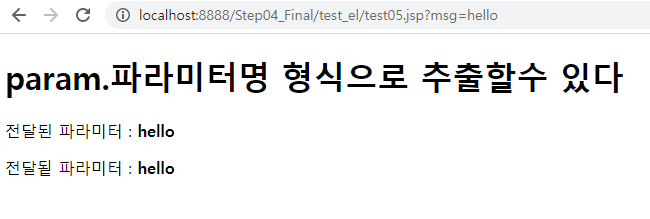
	<h1>param.파라미터명 형식으로 추출할수 있다</h1>
	<p> 전달된 파라미터 : <strong>${param.msg }</strong></p>
	<p> 전달됱 파라미터 : <strong><%=request.getParameter("msg") %></strong></p>
</body>
</html>
test06.jsp
<%@ page language="java" contentType="text/html; charset=UTF-8"
    pageEncoding="UTF-8"%>
<%
	Cookie cook=new Cookie("savedId", "kimgura");
	cook.setMaxAge(60);
	response.addCookie(cook);
%>
<!DOCTYPE html>
<html>
<head>
<meta charset="UTF-8">
<title>test06.jsp</title>
</head>
<body>
	<h1>쿠키에 저장된 내용도 EL 로 추출할수 있다.</h1>
	<p>savedId 라는 키값으로 60초 동안 유지되는 쿠키를 응답했습니다.</p>
	<a href="test07.jsp">쿠키값 확인하기</a>
</body>
</html>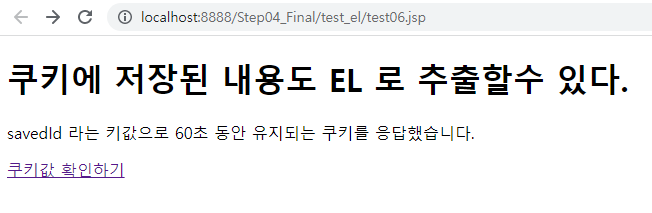
쿠키에 저장된 내용도 EL로 추출할 수 있다.
Cookie cook=new Cookie("savedId", "kimgura");
cook.setMaxAge(60);
response.addCookie(cook);
우선 쿠키를 만들었다.
test07.jsp
<%@ page language="java" contentType="text/html; charset=UTF-8"
    pageEncoding="UTF-8"%>
<!DOCTYPE html>
<html>
<head>
<meta charset="UTF-8">
<title>/test_el/test07.jsp</title>
</head>
<body>
	<p> savedId 라는 키값으로 쿠키가 저장되었는지 여부 : ${not empty cookie.savedId }</p>
	<p> savedId 라는 키값으로 저장된 값 : ${cookie.savedId.value }</p>
</body>
</html>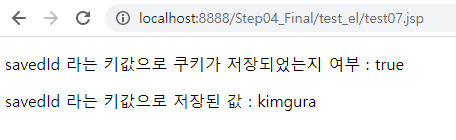
<p> savedId 라는 키값으로 쿠키가 저장되었는지 여부 : ${not empty cookie.savedId }</p>
<p> savedId 라는 키값으로 저장된 값 : ${cookie.savedId.value }</p>
'Servlet&JSP' 카테고리의 다른 글
| Step04_Final(jstl) (0) | 2022.08.21 |
|---|---|
| Step04_Final(cookie) (0) | 2022.08.21 |
| Step04_Final (jstl 문법 비교, 로그인navbar) (0) | 2022.08.21 |
| Step03_Scope (HttpSession) (0) | 2022.08.19 |
| Step03_Scope (request, response, session 정의 및 메소드 정리) (0) | 2022.08.19 |


