Step01_hello
<!DOCTYPE html>
<html lang="en">
<head>
    <meta charset="UTF-8">
    <meta name="viewport" content="width=device-width, initial-scale=1.0">
    <meta http-equiv="X-UA-Compatible" content="ie=edge">
    <title>Step01_hello.html</title>
</head>
<body>
<p>p1</p>
<p class="my-class">p2</p>
<p class="my-class">p3</p>
<p class="my-class">p4</p>
<p id="one">p5</p>
<!-- jquery 로딩하기 -->
<script src="js/jquery-3.4.1.js"></script>
<script>
    $("p").text("김구라");

    $("p")[0].innerText="해골";

    $(".my-class").css("color","red");

    $("#one").css("background-color","yellow");

</script>
</body>
</html>
대상을 지정할때 $("p").first(), $("p").last() , $("p").eq(2) 같은 방식도 있다. (각각 첫번째, 마지막, 세번째 p)
Step02_event
<!DOCTYPE html>
<html lang="en">
<head>
    <meta charset="UTF-8">
    <meta name="viewport" content="width=device-width, initial-scale=1.0">
    <meta http-equiv="X-UA-Compatible" content="ie=edge">
    <title>Step02_event.html</title>
</head>
<body>
<input type="text" id="inputMsg" placeholder="메세지입력..."/>
<button id="one">눌러보셈</button>
<p id="result"></p>
<ul id="msgList">
    <li>하나</li>
    <li>두울</li>
</ul>
<script src="js/jquery-3.4.1.js"></script>
<script>

    // document.querySelector("#one")
    // .addEventListener("click", function(){
    //     var msg=document.querySelector("#inputMsg").value;
    //     document.querySelector("#result").value=msg;
    //     document.querySelector("#inputMsg").value="";
    // });oli999

    //아이디가 one 인 요소에 click 이벤트가 일어났을때 실행할 함수 등록
    $("#one").on("click", function(){
        //아이디가 inputMsg 인 곳에 입력한 value 값을 읽어와서
        var msg=$("#inputMsg").val();
        //아이디가 result 인 요소의 innerText 로 넣어주기
        $("#result").text(msg);
        $("#inputMsg").val("");
    });

    $("#inputMsg").on("keydown", function(event){
        console.log(event);
        if(event.keyCode == 13){//만일 엔터키를 눌렀다면
            //아이디가 inputMsg 인 곳에 입력한 value 값을 읽어와서
            var msg=$("#inputMsg").val();
            //아이디가 result 인 요소의 innerText 로 넣어주기
            $("#result").text(msg);
            $("#inputMsg").val("");
            //li 요소를 만들어서 아이디가 msglist인 곳에 추가
            $("<li></li>").text(msg).appendTo("#msgList");
        }
    });

    //input 요소에 focus 주기
    $("#inputMsg").focus();

</script>
</body>
</html>
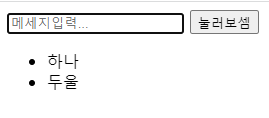
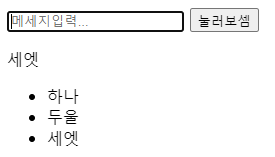
.on()은 이벤트가 일어났을때의 동작을 설정하기 위한 메소드이다.
.val()은 양식(form)의 값을 가져오거나 값을 설정하는 메소드이다.
A.append to(B)는 A의 값을 B 마지막 부분에 입력해준다.
(A,B는 예시이다, 뒤가 아닌 앞에 입력하고 싶다면 .prependTo()가 있다.)
step03_example
<!DOCTYPE html>
<html lang="en">
<head>
    <meta charset="UTF-8">
    <meta name="viewport" content="width=device-width, initial-scale=1.0">
    <meta http-equiv="X-UA-Compatible" content="ie=edge">
    <title>Step03_example.html</title>
    <style>
        .box{
            width: 100px;
            height: 100px;
            border: 1px solid red;
        }
    </style>
</head>
<body>
<div class="box"></div>
<div class="box"></div>
<div class="box"></div>
<script src="js/jquery-3.4.1.js"></script>
<script>
    //클래스명이 box 인 모든 요소에 mouseover 이벤트가
    //발생했을때 실행할 함수 등록하기
    $(".box").on("mouseover", function(){
        /*
            여기 함수 안에서 this 라는 예약어는
            mouseover 이벤트가 발생한 바로 그요소의
            참조값을 가리키게 된다.

            this 는 순수 문서객체의 참조값이므로

            .css() 같은 동작은 할수가 없다.

            따라서

            $(this) 와 같이 jquery 의 기능을 사용가능하게 해서
            $(this).css() 같은 동작이 가능한 것이다.
        */


        //this.style.backgroundColor="yellow";

        //$(this) 는 이벤트가 일어난 바로 그요소가 선택된다.
        $(this)
        .css("background-color","yellow")
        .text("mouseover!");
    });

    //mouseout 이벤트가 일어 났을때
    //배경색을 흰색으로
    //text 는 mouseout! 이라고 바뀌게 해 보세요.
    $(".box").on("mouseout", function(){
        $(this)
        .css("background-color", "white")
        .text("mouseout!");
    });

    $(".box").on("mousedown", function(){
        $(this)
        .css("width","120px")
        .css("height","120px");
    });

    $(".box").on("mouseup", function(){
        $(this)
        .css("width","100px")
        .css("height","100px");
    });

</script>
</body>
</html>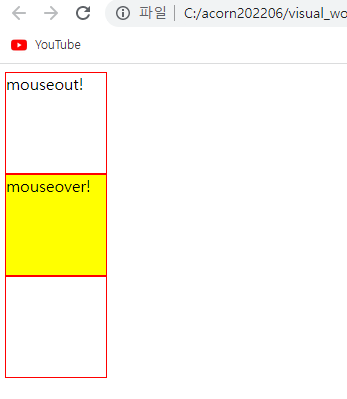
예시에서
첫번째 상자(mouseout) : 마우스가 닿았다가 지나쳤다.
두번째 상자(mouseover): 마우스가 닿아 있다
세번째 상자: 로드시 그대로
Step04_class
<!DOCTYPE html>
<html lang="en">
<head>
    <meta charset="UTF-8">
    <meta name="viewport" content="width=device-width, initial-scale=1.0">
    <meta http-equiv="X-UA-Compatible" content="ie=edge">
    <title>Step04_class.html</title>
    <style>
        .change{
            color:red;
            font-weight: bold;
            font-size: 20px;
        }
    </style>
</head>
<body>
<p id="one">test!</p>
<p id="two">test!</p>
<script src="js/jquery-3.4.1.js"></script>
<script>
    $("#one").on("mouseover", function(){
        $(this)
        .css("color","red")
        .css("font-weight","bold")
        .css("font-size","20px");
    });

    $("#one").on("mouseout", function(){
        $(this)
        .css("color","black")
        .css("font-weight","normal")
        .css("font-size","16px");
    });

    //위와 동일한 기능을 class 를 활용해서 구현하기
    $("#two").on("mouseover", function(){
        $(this).addClass("change");
    });

    $("#two").on("mouseout", function(){
        $(this).removeClass("change");
    });
</script>
</body>
</html>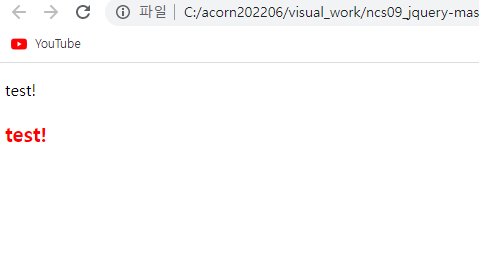
이번 예시에서는 아래의 텍스트에 마우스 오버하였다.
addclass와 removeclass로 특정 이벤트(mouseover, mouseout)에 특정 css를 추가 제거하였다.
'javascript, framework > jquery' 카테고리의 다른 글
| Step09_example (0) | 2022.09.16 |
|---|---|
| Step08_regExp(정규표현식 활용 예제) (0) | 2022.09.16 |
| Step07_form (폼) (0) | 2022.09.16 |
| Step06_animate (트랜지션, 이동) (0) | 2022.09.16 |
| step05_effect (사라졌다 나타나는 효과들) (0) | 2022.09.16 |


