
py 즉 파이썬 파일은 java의 서블릿과 비슷한 역할이라고 볼 수 있다.
httpserver2
# 웹 서버 구축

from http.server import CGIHTTPRequestHandler, HTTPServer
# CGIHTTPRequestHandler : 동적으로 웹서버를 운영 가능
# CGI : 웹서버와 외부 프로그램 사이에서 정보를 주고 받는 방법 또는 규약

port = 8888

class Handler(CGIHTTPRequestHandler):
    cg_directories = ['/cgi-bin']

serv = HTTPServer(('127.0.0.1', port), Handler)
print('웹 서비스 시작 ...')
serv.serve_forever()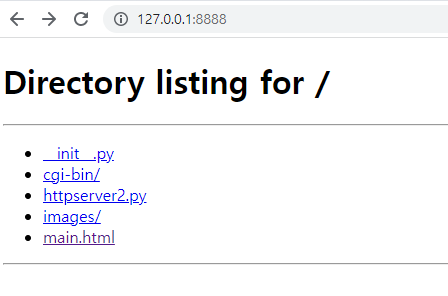
main.html
<!DOCTYPE html>
<html>
<head>
<meta charset="UTF-8">
<title>Insert title here</title>
</head>
<body>
<h1>메인페이지</h1>
<ul>
	<li><a href="cgi-bin/hello.py">hello</a></li>
	<li><a href="cgi-bin/world.py">world</a></li>
	<li><a href="cgi-bin/my.py?name=tom&age=23">my(get 요청)</a></li>
	<li><a href="friend.html">친구정보</a></li>
	<li><a href="cgi-bin/sangpum.py">DB 상품자료 보기</a></li>
</ul>
</body>
</html>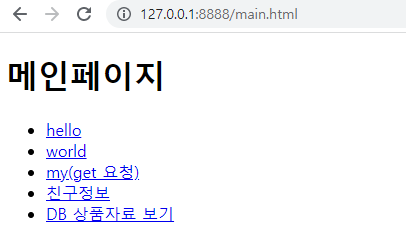
hello.py
파이썬에서 웹 작성 아주 기본적인 구조
MIME type
https://developer.mozilla.org/ko/docs/Web/HTTP/Basics_of_HTTP/MIME_types
# 웹 서비스 대상 파일
kor = 50
eng = 60
tot = kor + eng
# MIME 문서의 타임을 결정
print('Content-Type:text/html;charset=utf-8\n')
print('<html><body>')
print('<b>안녕하세요</b> 파이썬 모듈로 작성했어요<br>')
print('총점은 %s'%(tot))
print('</body></html>')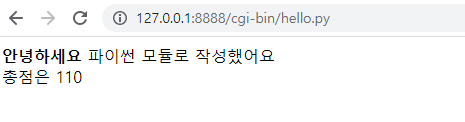
word.py
비교적 편하게 마크업하기, 이미지 넣기
s1 = '자료1'
s2 = '두번째 자료'

print('Content-Type:text/html;charset=utf-8\n')
print('''
<!DOCTYPE html>
<html>
<head>
<meta charset="UTF-8">
<title>Insert title here</title>
</head>
<h1>반가워요</h1>
자료 출력 : {0}, {1}
<br>
<img src='../images/logo.png' width='60%' />
<br>
<a href='../index.html'>메인으로</a>
</body></html>
'''.format(s1, s2))
my.py
get 방식 처리, 사용자가 전송한 정보를 수신 후 사용
# 사용자가 전송한 정보를 수신 후 사용

import cgi

form = cgi.FieldStorage()
irum = form['name'].value
nai = form['age'].value

print('Content-Type:text/html;charset=utf-8\n')
print('''
<html>
<body>
이름은 {0}
<br>
나이는 {1}
</body>
</html>
'''.format(irum, nai))
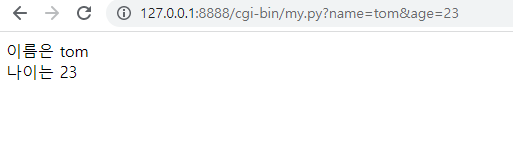
수신 코드
import cgi

form = cgi.FieldStorage()
irum = form['name'].value
nai = form['age'].value
friend.html
post 전송
<!DOCTYPE html>
<html>
<head>
<meta charset="UTF-8">
<title>Insert title here</title>
</head>
<body>
<p>** 친구 정보 입력 **</p>
<form action="/cgi-bin/friend.py" method="post">
이름 : <input type="text" name="name" value="홍길동"><br/>
전화 : <input type="text" name="phone" value="111-1111"><br/>
성별 :
<input type="radio" name="gen" value="남" checked>남
<input type="radio" name="gen" value="여">여
<br>
<br>
<input type="submit" value="전송">
</form>
</body>
</html>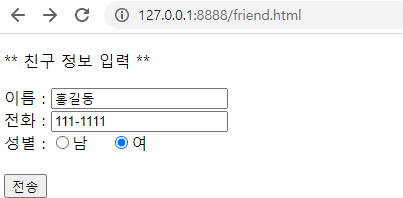
friend.py
post 수신
import cgi

form = cgi.FieldStorage()

# java : request.getParameter("name")
name = form['name'].value
phone = form['phone'].value
gen = form['gen'].value

print('Content-Type:text/html;charset=utf-8\n')
print('''
<html>
<body>
친구 이름은 {0}
<br>
전화는 {1}, 성별은 {2}
</body>
</html>
'''.format(name, phone, gen))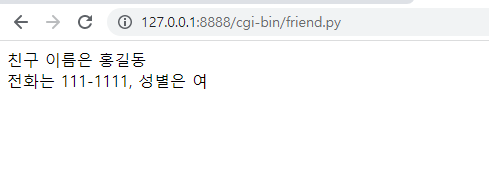
sangpum.py
자료를 웹으로 출력
# MariaDB 자료 웹으로 출력
import MySQLdb
import pickle

print('Content-Type:text/html;charset=utf-8\n')
print('<html><body>')
print('<h2>상품정보</h2>')
print('<table border="1">')
print('<tr><th>코드</th><th>품명</th><th>수량</th><th>단가</th></tr>')

with open('mydb.dat', 'rb') as obj:
    config = pickle.load(obj)

try:
    conn = MySQLdb.connect(**config)
    cursor = conn.cursor()

    cursor.execute("select * from sangdata")
    datas = cursor.fetchall()
    for code,sang,su,dan in datas:
        print('''
            <tr>
                <td>{0}</td>
                <td>{1}</td>
                <td>{2}</td>
                <td>{3}</td>
            </tr>
        '''.format(code,sang,su,dan))

except Exception as e:
    print('처리오류: ',e)
finally:
    cursor.close()
    conn.close()

print('</table>')
print('</body></html>')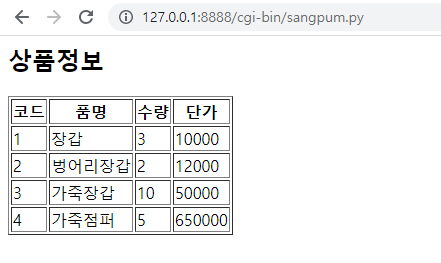
'python' 카테고리의 다른 글
| 웹 서버 구축 - SimpleHTTPRequestHandler (0) | 2022.10.14 |
|---|---|
| 웹 크롤링 - 미완성 (1) | 2022.10.13 |
| thread - pull, process (0) | 2022.10.13 |
| socket, thread - 채팅 서버와 클라이언트 (0) | 2022.10.13 |
| thread - lock (빵 공장 예제) (0) | 2022.10.13 |

